Generating the Formula
When the network is valid, click Generate Formula in the toolbar. The Wizard validates the design and produces the AmiBroker AFL. For a Standard network the results window is tabbed: a Combined Formula and a Separate Formulas pair, with Combined shown by default. A Walk-Forward network always produces a single formula instead — see below.
The results window (Standard)
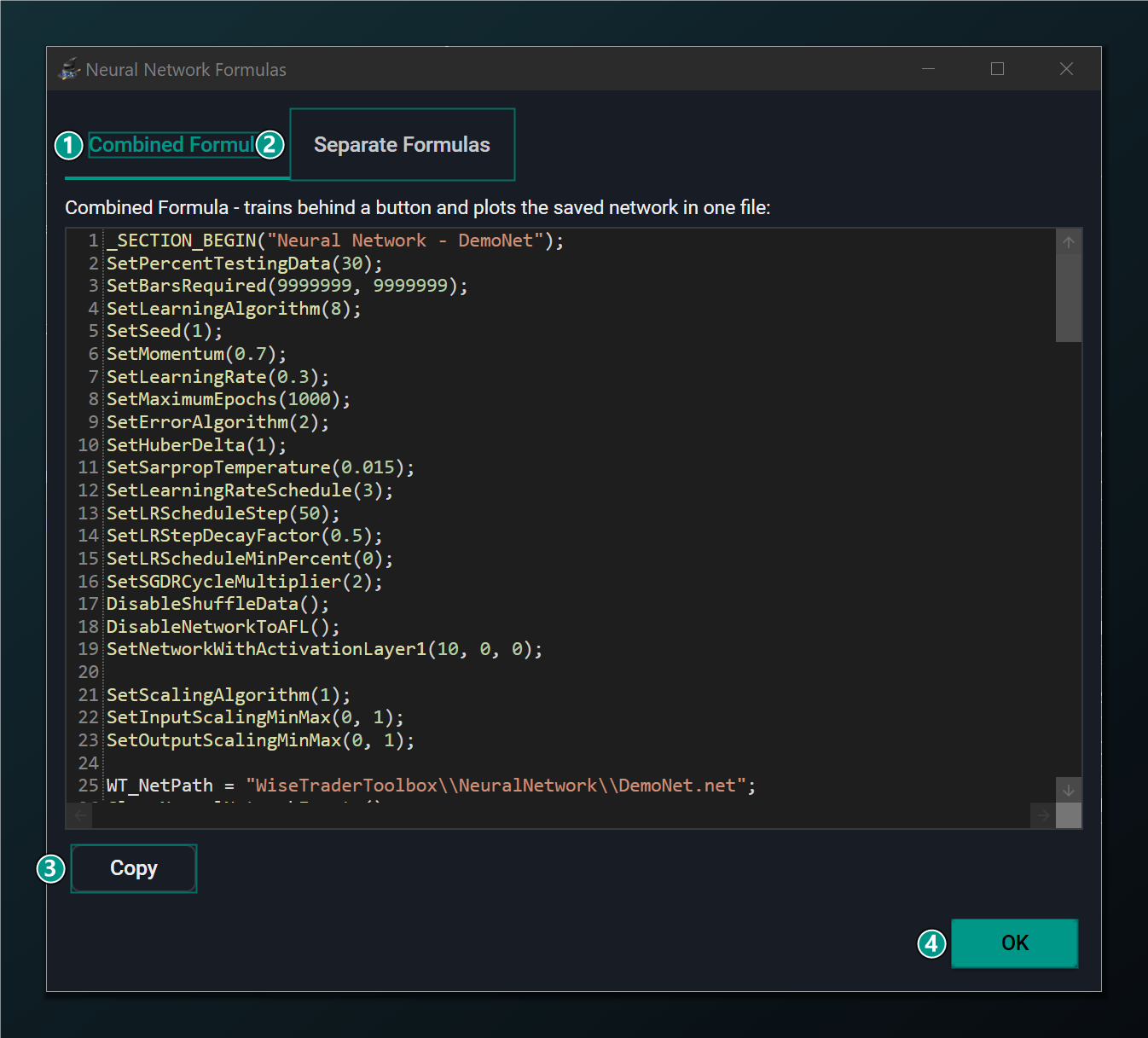
- Combined Formula tab — selected by default; a single self-contained AFL that trains on demand and then plots automatically (see below).
- Separate Formulas tab — the classic pair: a training formula and an indicator formula shown side by side.
- Copy — copy the formula on the active tab to the clipboard, ready to paste into AmiBroker.
- OK — close this window.
There is no setting to choose between them — both are always offered, so you can copy whichever suits how you want to work.
Combined Formula
The Combined Formula is a single, self-contained AFL built on the WiseTrader Toolbox Neural Network On A Chart pattern. You drop it straight onto a chart and it handles training and plotting for you:
- It emits the network settings.
- It checks the disk — opening the saved
WiseTraderToolbox\NeuralNetwork\<Name>.netfile — to see whether the network has already been trained. - It draws a Train / Retrain button (the caption depends on whether a saved network already exists) and trains only when you click it, across the configured ticker pool — so it does not retrain on every chart recalc.
- It re-checks the disk after training.
- Once a trained network exists it automatically plots the prediction on every recalc; until then it shows a centred “the neural network has not been trained yet” message.
This is the convenient choice for most users: one file you can leave on a chart that trains on demand and plots automatically. It is available for all Standard networks, including the sequence models (LSTM, GRU, TCN and Transformer) and networks that use ensembling, Layer Normalization or a categorical input.
Separate Formulas
The Separate Formulas tab is the classic two-formula workflow, unchanged. Use it when you prefer to keep training and the indicator apart — for example training in the Analysis window and running the indicator on a chart elsewhere.
- Training Formula — the AFL that trains the neural network on your data.
- Indicator Formula — the AFL that plots the trained network's prediction on a chart.
Copy each formula with its Copy button and paste it into AmiBroker:
- Paste the Training Formula into a new AFL document and run it (as a scan, or by applying it to a chart) to train the network. It writes the trained weights to a
.netfile named after your network. - Paste the Indicator Formula onto a chart. It loads the saved network and plots its prediction.
With the Separate Formulas, run the Training Formula first. The
Indicator Formula loads the saved .net file, so it has nothing to
plot until training has produced that file at least once. The
Combined Formula avoids this ordering for you — it draws a
“not trained yet” message until you click its Train button.
If the network is not yet valid — for example it lacks a name, a second input or an output — Generate Formula stays disabled and the reason appears in the Messages area at the bottom of the main window. See Building a Network.
The two formulas above — which call the trained network through the toolbox — are available for every Standard design. The separate Generate Indicator button, which embeds the weights directly in AFL (network-to-AFL export, MLP only), is more restricted: it greys out for any sequence model, when Layer Normalization is on, when there is a categorical input, or when Ensemble Size is above 1. A tooltip gives the reason.
Both tabs produce plain, readable WiseTrader Toolbox code. You can edit it freely in AmiBroker — combine the prediction with your own buy/sell rules, add stops, or feed it into a backtest — or fold extra logic in up front with code snippets.
Generating and training a formula is the easy part — trusting it is the discipline. Before trading the prediction, check that it holds up on the held-out test data, not just the bars it trained on, and build a real system (entries, exits, costs, risk) around it. See Neural Networks for Traders on why a good-looking training fit can still be an overfit mirage.